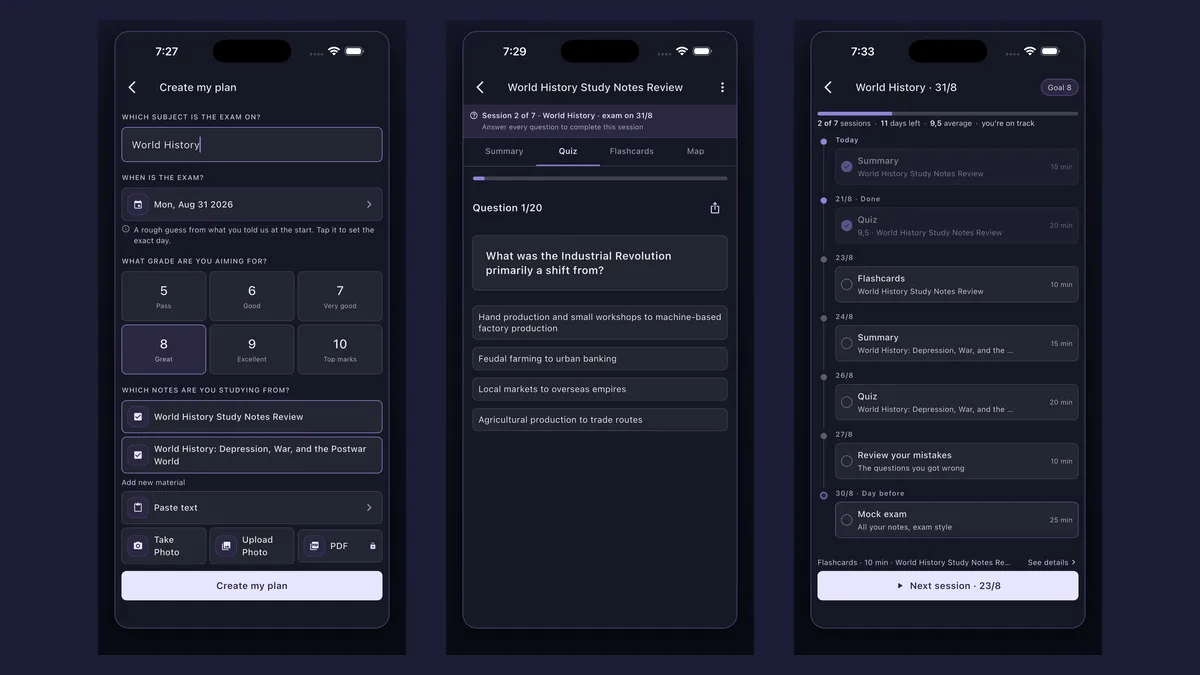
How does an AI study planner work? In Synt you enter the subject, the exam date and the grade you are aiming for, then add your notes. Synt splits the material into short sessions up to that day: summaries, quizzes, flashcards, a review of your mistakes and a mock exam the day before.
A planner is only as good as the plan you put in it — and that is the hard part. Tell Synt when the exam is, the grade you want and which notes it covers, and it builds the schedule for you: what to read, when to quiz yourself and when to go back over what you got wrong. Each session takes 10 to 25 minutes. Works in your browser, no install needed — or grab the app.

Each set of notes starts with a summary, so the first session is about understanding, not memorizing.
Then practice: multiple-choice quizzes and flashcards from the same notes, spread over the days you have.
The questions you got wrong come back in their own session, so your weak spots get extra time.
20 mixed questions from all the material in 25 minutes — a practice test that tells you whether you are ready.
Name the subject, pick the exam date and choose the grade you are aiming for.
Paste text, take a photo of your notes or pick materials you already have in Synt (PDFs with Synt Pro).

The home screen shows your next session. Up to two a day when the exam is close; with more time, some days stay free.

per session — short enough for any afternoon
per exam, each with its own notes and progress
a 20-question mock exam on everything
With the exam date, your target grade and the materials you add, Synt works out how many sessions fit and spreads them: a summary per material, quizzes and flashcards to practise, a review of your mistakes and the mock exam the day before. Up to two sessions on the same day if the exam is close.
Yes, one per exam. The home screen shows the next session of each one, and every plan keeps its own notes, progress and mock exam.
Not necessarily: sessions are spread between today and the exam, and with more time some days stay free. Each session lasts 10 to 25 minutes.
Creating an account is free. In your browser, at app.synt.app, you can create the plan and follow its sessions within the daily free limit; in the iOS and Android app the first two sessions are free and the rest unlock with Pro, which also removes the limits and lets you upload PDFs.
Yes. Go to app.synt.app in any browser, create a free account and you get the same summaries, quizzes and flashcards as in the app; your material syncs between your phone and your computer.
You can start from the syllabus: Synt turns the list of topics into study notes and builds the plan from them. AI-written notes can contain mistakes, so add your own notes or textbook pages when you have them.
Do it without distractions and always end with practice. Our guides on how to focus while studying and how to study for exams cover the rest.
Join 200,000+ students who study smarter with Synt.