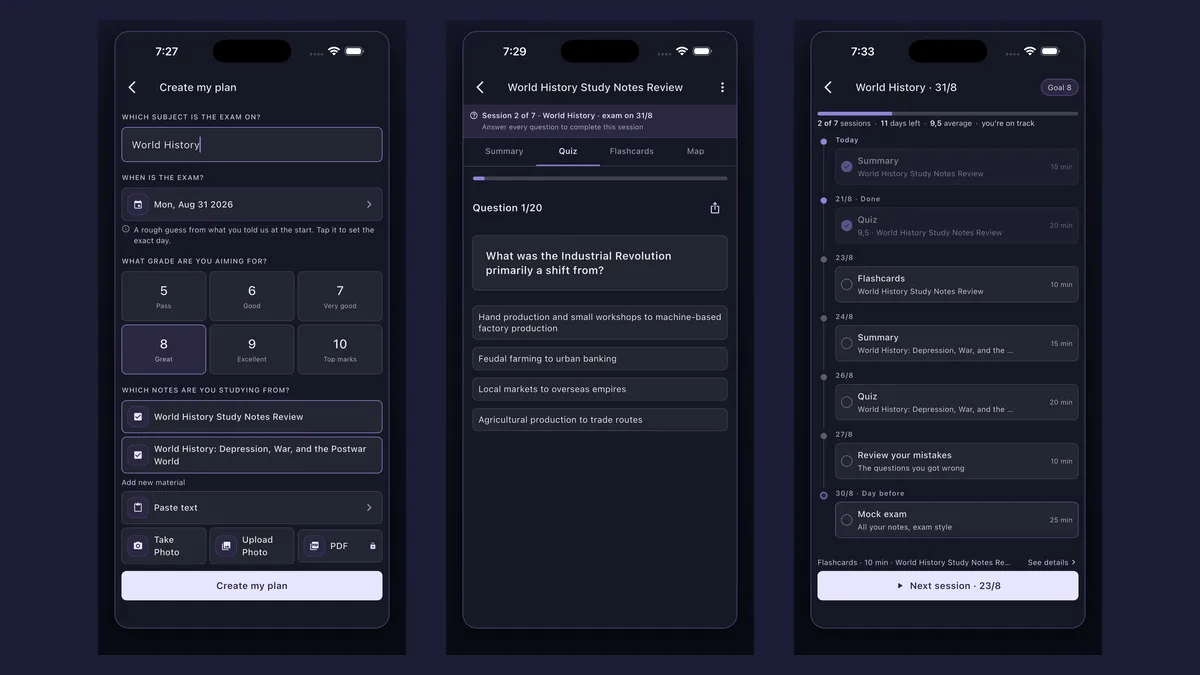
How do you make a practice test from your notes? In Synt, create a plan with your exam date and add the notes for every topic. The day before the exam it builds a mock test of 20 mixed questions from all the material, timed at 25 minutes, and shows your score. You can retake it with new questions.
A quiz on one chapter tells you whether you know that chapter. A practice test tells you whether you are ready for the exam. Add the notes for every topic the exam covers and Synt builds a mock exam from all of them — 20 multiple-choice questions, mixed, without telling you which topic each one comes from — so you practise the way the real test will feel. Works in your browser, no install needed — or grab the app.
Got your notes handy? Paste them below and answer 3 questions now — no sign-up.


No sign-up needed. Paste a section of your notes (200 to 6,000 characters) and get three multiple-choice questions written from it — the same engine that builds full 20-question quizzes in Synt.
Want all 20 questions, saved and ready to review? Create your free account
Questions come from every material in the plan, shuffled and without the topic label — like the real exam.
A 25-minute session for 20 questions, so you practise pacing as well as content.
At the end you see your score; in the app, also the questions you missed.
Retake it as often as you like, with 20 new questions each time, and see whether your score goes up after reviewing.
Enter the subject, the exam date and the grade you are aiming for — the study planner does the scheduling.
Paste your notes or take photos of the pages for each topic the exam covers (PDFs with Synt Pro).

The day before the exam, the practice test is waiting: 20 mixed questions in 25 minutes, then your score.

mixed questions from all your notes
for the whole practice test
of questions every time you retake it
You create a plan up to the exam with your notes, and Synt schedules the practice test for the day before: 20 multiple-choice questions from the whole syllabus, mixed and without the topic shown, in a 25-minute session. At the end you see your score; in the app, also the questions you missed.
From your notes. Every question is generated from the material you added to the plan, so the practice test covers exactly what your exam covers.
Yes, as many times as you want, with 20 new questions each time. It is the way to check whether your score improves after reviewing.
A quiz covers one material and is for practising a topic — for that, use the quiz generator or notes to quiz. The practice test mixes every material of the exam, is timed and gives you an overall score: it tells you whether you are ready.
Creating an account is free. In your browser, at app.synt.app, you can create your plan and take the practice test within the daily free limit; in the iOS and Android app the first two sessions of the plan are free and the rest, including the practice test, unlock with Pro, which also removes the limits and lets you upload PDFs.
Yes. Go to app.synt.app in any browser, create a free account and you get the same summaries, quizzes and flashcards as in the app; your material syncs between your phone and your computer.
At the end: first study each topic and test yourself on it, then take the mock exam to see where you stand. Our guide on how to study for exams explains the order.
Join 200,000+ students who study smarter with Synt.