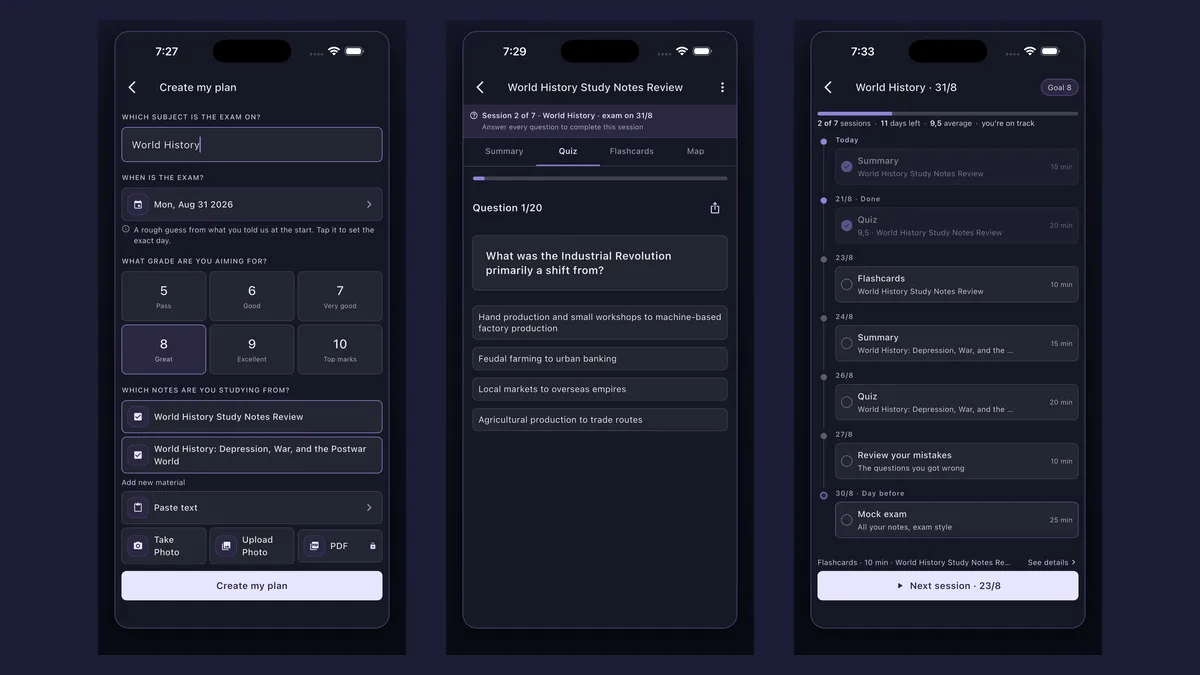
How do you make a reviewer with AI? Paste your notes or take a photo of your handout in Synt and it writes the reviewer for you: the key points of the lesson first, then practice questions and flashcards from the same material. It works in your browser, and you can try it below without an account.
Quiz on Friday, long test next week, periodical exams after that — and a stack of handouts and modules to review. Instead of copying everything into a notebook, paste the lesson or snap the pages and Synt turns them into a reviewer: a short summary of what matters, then multiple-choice questions to check yourself, all from your own teacher’s material. Works in your browser, no install needed — or grab the app.
Got a text handy? Paste it below and see the summary now — no sign-up.


No sign-up needed. Paste a section of your notes (200 to 6,000 characters) and get the main idea and the key points — the same engine that summarizes whole documents in Synt.
Want the full summary, with a quiz and flashcards, saved in your account? Create your free account
Synt condenses the lesson into the main idea and the points you need to remember. You choose the length, from a short summary to a detailed one.
From the same material, a 20-question multiple-choice quiz. You answer, see what you got right and go back to the ones you missed.
Definitions, formulas, names and dates become flashcards — the part of a reviewer you drill on the commute or the night before.
Handouts, photocopies, modules and handwritten notes: take a photo and Synt reads the page. Uploading a PDF works too, with Synt Pro.
Paste the text of your notes or module, or photograph the handout. One lesson per reviewer works best; you can add the next one later.

Synt writes the summary with the key points, then the quiz and the flashcards from the same text — no typing up your notes first.

Answer the questions, then go back to the flashcards for what you missed. If the exam has a date, the study planner spreads the review over the days you have left.
summary, practice quiz and flashcards from the same handout
multiple-choice questions per quiz, checked as you answer
of the page is enough to start — no typing
In the Philippines, a reviewer is the study material you prepare before a quiz or an exam: a condensed version of the lesson with the key terms, often with practice questions. Synt makes both parts from your own notes.
Paste the text or take a photo of the pages in Synt. You get the summary with the key points first; from there, one tap makes a quiz and another makes flashcards.
Yes — in your browser at app.synt.app or as an app on iOS and Android. You can make your first reviewers without paying; Pro unlocks unlimited generations, PDFs and longer documents.
Yes. Go to app.synt.app in any browser, create a free account and you get the same summaries, quizzes and flashcards as in the app; your material syncs between your phone and your computer.
Yes. Add each lesson the exam covers and create a study plan with the exam date: Synt schedules short sessions — summary, quiz, flashcards, a review of your mistakes and a mock exam the day before.
Uploading a PDF is part of Synt Pro. Without paying, you can paste the text from the PDF or take photos of the pages.
Yes. A quiz made in Synt can be shared with a 6-character code or a link, so your study group answers the same questions.
Close the reviewer and answer the questions first; reread the summary only for what you got wrong. Testing yourself is what makes it stick — see active recall and spaced repetition for the schedule.
Join 200,000+ students who study smarter with Synt.